
Home automation means connecting devices like lights, locks, plugs, and cameras to a network so you can control them from your phone or by voice. Beginners should start with one device, pick a system that will still work in a few years, and plan for local factors like power cuts before committing. Reliable home automation solutions in Jaipur take responsibility for all three from day one.
A smart home is not about gadgets for the sake of gadgets. It is about your house doing small jobs on its own, so you do not have to think about them.
Turning off a light you forgot about. Letting a delivery person in while you are stuck in traffic. Getting a phone alert if your front door opens at 2 am. That is home automation in practice, not theory.
This guide walks you through the basics in plain language before you buy your first device or call a home automation company in Jaipur for a full setup.
How Home Automation Works
Home automation has three parts working together. First, devices: your smart bulbs, plugs, locks, or cameras. Second, a network, usually your home Wi-Fi, sometimes helped by a separate wireless protocol. Third, a way to control it all, an app, a voice assistant, or a physical hub.
When these three parts talk to each other properly, your home starts to respond to you instead of the other way round.
Key Terms Every Beginner Should Know
- IoT (Internet of Things): devices that connect to the internet and talk to each other.
- Hub: a device that connects and manages several smart products in one place.
- Ecosystem: a brand’s own system, such as Google Home, that ties compatible devices together.
- Zigbee and Z-Wave: low-power wireless networks built just for smart devices, separate from Wi-Fi.
- KNX: a wired automation standard, common in premium Indian homes and buildings.
- Matter: a newer standard letting devices from different brands work together. More below.
Wired vs Wireless Automation: What Should You Actually Choose?
This is usually the first real decision a beginner faces.
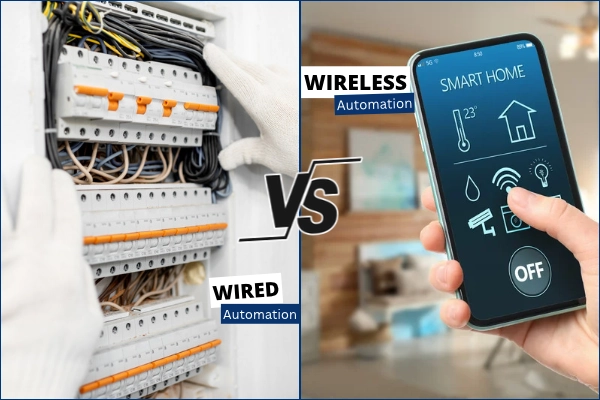
Wired vs wireless
Wired systems run cables behind your walls to connect switches, sensors, and controllers. Wireless systems use Wi-Fi, Zigbee, or Z-Wave instead, with no new wiring needed.
Wired setups tend to be more stable and less likely to lag, but need planning before construction or a proper retrofit. Wireless setups are faster to install and far more common for adding automation to a home that already exists.
KNX vs Wi-Fi and Zigbee
KNX is a wired standard used heavily in premium Indian projects. It is reliable and built to last decades, but usually needs a trained electrician and higher upfront cost.
Wi-Fi and Zigbee devices are wireless, cheaper to start with, and easy to add one at a time. Zigbee tends to be more power efficient and handles many devices better than relying on Wi-Fi alone.
Compatibility, interoperability and Matter
Here is the question most beginners actually want answered: if you buy smart devices from different brands, will they work together?
Sometimes, and sometimes not. Ecosystems like Google Home, Amazon Alexa, and Apple Home were built separately, so a device made only for one may not talk to the others. This is why people end up with three or four different apps just to control one home.
Matter is a newer standard built to fix exactly this problem. It lets a single device work across Google, Amazon, Apple, and other platforms at the same time, without separate hubs for each one. It is backed by all the major players in the industry, and adoption is growing fast, though not every product category supports it yet.
A few practical points worth knowing before you buy anything:
- Committing fully to one ecosystem gives a smoother experience today, but locks you in later.
- Choosing Matter-compatible devices where possible gives more freedom to mix brands.
- If a manufacturer discontinues a product, devices tied only to its own app can stop working, even if the hardware is fine.
- Think about what you might add in two or three years, not just what you need right now.
A rented flat usually suits wireless, retrofit-friendly devices that move with you. A home you own long term can justify wired KNX for the rooms that matter most, mixed with wireless for the rest.
The Core Building Blocks of a Smart Home
- Smart lighting and switches: control brightness, schedule on and off times, or dim lights by voice.
- Smart plugs: turn any regular appliance into a controllable one, without rewiring.
- Smart locks: keyless entry using a code, fingerprint, or app.
- Smart security: cameras, motion sensors, and video doorbells that send alerts to your phone.
- Climate and appliance control: smart thermostats, fans, and air purifiers that adjust automatically.
Most beginners start with lighting or plugs, since both are cheap and quick to install.
New Home vs Retrofitting an Existing Home
If building or fully renovating, you can plan wiring, hub placement, and even KNX from the start, giving the cleanest result.
If you already live in the home, retrofit devices are the practical answer. Smart switches that fit over existing wiring, plug-in devices, and Wi-Fi cameras avoid breaking walls or redoing electrical work.
How to Start Your Smart Home on a Budget
You do not need to automate your whole house at once. A slow, steady start works better and costs less in mistakes.
- Start with one device. A smart plug or a single smart bulb is enough to learn how things work.
- Check your Wi-Fi first. Weak signal in any room means devices there will lag or drop off. A mesh router or extender fixes this cheaply.
- Add a hub or app once you have two or three devices. This becomes your control centre so you are not juggling several apps.
- Expand room by room. Living room first for lighting, then entryway for locks and motion sensors, then kitchen for plugs and appliances.
What Does Home Automation Cost in Jaipur?
Costs vary a lot, but a rough starting point helps with planning.
A basic setup with a few smart plugs, bulbs, and a smart speaker usually costs a few thousand rupees. A mid-range setup covering lighting, locks, and basic security across a few rooms runs into the tens of thousands. A full premium setup using wired KNX across a whole house can run into lakhs, closer to what a full-service Smart home automation in Jaipur typically involves.
Starting small and expanding later almost always works out cheaper than doing everything on day one.
Why Jaipur Homes Need Some Extra Thought
Jaipur’s climate and infrastructure bring a few practical points generic guides usually skip.
- Power cuts and voltage fluctuations are still common in parts of the city. A small UPS or inverter backup for your router and central hub is worth the investment. Without it, even a well-installed system goes dark the moment the power does.
- Heat and dust affect outdoor cameras, sensors, and smart locks over time. Look for devices rated for higher temperatures and dust resistance.
- Network reliability matters as much as the devices themselves. If your hub or router loses power, automations stop working, not just slow down. A small battery backup keeps basic functions running through short outages.
- Rented vs owned homes change what makes sense. Renters should lean wireless. Owners staying long term get more value from wired options.
Common Smart Home Myths, Busted
Myth: Smart homes are only for the wealthy. A single smart plug costs less than a nice dinner out.
Myth: You need to rewire your entire house. Most beginner devices are retrofit and plug straight into existing switches or sockets.
Myth: It is too complicated for non-technical people. Most apps today are built for a five-minute setup.
Myth: It will not work in a rented flat. Wireless, retrofit devices move with you and leave no permanent changes.
Real Benefits: Security, Energy Savings, Convenience and Home Value
A well set up smart home genuinely earns its cost back over time. Automated lighting and thermostats cut wasted electricity. Motion-triggered lights and camera alerts add real security, especially useful for homes with children or elderly family members.
Everyday convenience, like unlocking your door without digging for keys, adds up faster than people expect. Many buyers today also see a smart, well-integrated home as a genuine value add when it comes time to sell.
DIY vs Professional Installation: Which Is Right for You?
Simple devices like plugs, bulbs, and basic smart switches are genuinely fine to install yourself. No special skill is needed.
Security systems, smart locks, and anything involving wiring changes are a different story. A poorly installed lock or camera can leave gaps in both security and reliability. This is exactly where a proper home automation company in Jaipur earns its cost, handling wiring, network setup, and making sure every device actually talks to the others.
Quick Self-Check: Are You Ready to Start?
Ask yourself:
- Am I renting or staying long term?
- Is my Wi-Fi strong in every room I want to automate?
- Have I picked Matter-friendly devices where possible?
- Do I have a power backup plan for my hub and router?
- Am I starting with one or two devices, not the whole house at once?
If most answers are yes, you are ready to begin.
Why Homeowners Choose Professional Home Automation Services
A DIY start works well for testing the waters. But once security, wiring, and long-term compatibility all need to work together, most homeowners find real value in proper home automation services in Jaipur rather than piecing it together alone.
VR Gypsum & Sound Solutions plans around your actual home, your budget, and Jaipur’s specific power and climate conditions, not a generic setup built for a different country’s infrastructure.
Conclusion
You do not need a fully automated house to get real benefits. Start with one device, understand how ecosystems and Matter affect your choices, and plan for Jaipur’s power and network realities from day one.
Done properly, smart home automation in Jaipur is not a luxury project. It is a practical upgrade that pays for itself in convenience, security, and peace of mind.
Q1. How do I start with home automation as a beginner?
Ans: Keep it simple and start with just one device, like a smart plug or bulb. Make sure your Wi-Fi is strong in that room, then add a hub or app once you have two or three devices. Start working on room by room, and put your router on a small UPS so things keep working during power cuts.
Q2. How much does home automation cost in Jaipur?
Ans: It depends on how far you want to go. A few smart plugs, bulbs and a speaker cost a few thousand rupees. Automating lights, locks and basic security in several rooms runs into the tens of thousands. A full wired KNX setup can reach lakhs. Starting small and adding later almost always costs less.
Q3. Should I choose wired (KNX) or wireless (Wi-Fi/Zigbee) automation?
Ans: If you rent or already live in your home, go wireless. It’s cheaper, quick to set up and easy to take with you. If you own your home long term, wired KNX is worth considering for the rooms that matter most, since it’s very reliable and lasts for decades. Many homes happily mix both.
Q4. Will smart devices from different brands work together?
Ans: Sometimes, but not always. Google Home, Alexa and Apple Home were built separately, so a device made for one may not work with another. Matter, a newer standard, is changing that by letting one device work across all the big platforms. Look for Matter-compatible devices if you want the freedom to mix brands.
Q5. What are the drawbacks of home automation, and how can homes avoid them?
Ans: The common headaches are brand compatibility, reliance on Wi-Fi and power, and the higher cost of wired systems. Frequent power cuts can switch off your whole setup. A UPS for your router and hub, Matter-friendly devices and dust- and heat-rated outdoor gear solve most of these problems.
